
Here’s the scenario:
A user calls up in a panic. They created an item, and started creating records throughout the database that references that item, but then realized the item has a typo. How do you find all instances of that item so you can clean up?
Or an alternate scenario:
You’re looking through parameters and codes, and find a product code you don’t recognize. You want to find everywhere that the product code is used, so that you can trace down what it was created for.
I’ve had both of these happen recently, and wanted to share the script that I wrote that helps with this sort of analysis.
Before I give you the code, here’s the instructions on how to use it:
I’ll reiterate my standard disclaimer. While this script creates a SELECT statement, it does (perhaps foolishly) have the option to run dynamically generated SQL. It can also create some pretty significant queries, so be careful.
Any code or advice in this blog is for research purposes only, and is not intended for production use.
Effectively, the script searches all columns that match a pattern you provide, for the value that you provide. There’s two ways to run it; either it spits out a script you can modify and run, or it will run the script directly.
There are 4 parameters for this script, and they should be pretty easy to figure out.
- SearchValue is the string you want to search for. In our examples above, it could be the misspelled item, or the product code you want to find.
- ColumnSearch is a search pattern for finding columns that might have the value you’re looking for. So for an item, you may want %item% to ensure you get all possible item fields, but for a product code you may just use product_code. It’s all dependent on how consistent column naming convention has been. *cough cough*
- ColumnType is the SQL data type of whatever you are looking for.
- ExecuteQuery is probably a bad idea. If this setting is set to 0, the query created will be output so you can edit and run it yourself. If the setting is 1, it will run the query for you.
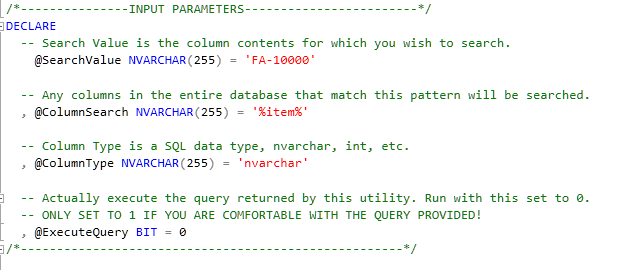
So with these parameters, let’s go looking for all instances of FA-10000 in the demo database. Running the script exactly as shown above will provide you with a link you can click to see the script that it came up with.
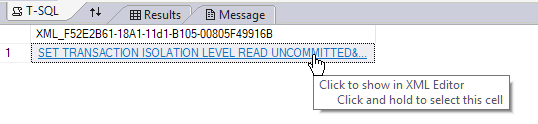

You can either copy that script into a new query window, or you can change the “ExecuteQuery” field to 1, and let it run itself.

Alright, with all of the pleasantries out of the way, here’s the code. Feel free to modify as you find necessary.
| /* | |
| Author: Jesse Brohinsky | |
| Company: Linemaster Switch Corporation | |
| Date: 2017-03-07 | |
| Comments: Returns a list of all tables and columns were a specific column/value pair is found. | |
| WARNING: If your table/column names are poorly formed, running [ExecuteSQLSp] at the bottom of | |
| this statement is generally a bad idea. | |
| */ | |
| /*---------------INPUT PARAMETERS------------------------*/ | |
| DECLARE | |
| -- Search Value is the column contents for which you wish to search. | |
| @SearchValue NVARCHAR(255) = 'FA-10000' | |
| -- Any columns in the entire database that match this pattern will be searched. | |
| , @ColumnSearch NVARCHAR(255) = '%item%' | |
| -- Column Type is a SQL data type, nvarchar, int, etc. | |
| , @ColumnType NVARCHAR(255) = 'nvarchar' | |
| -- Actually execute the query returned by this utility. Run with this set to 0. | |
| -- ONLY SET TO 1 IF YOU ARE COMFORTABLE WITH THE QUERY PROVIDED! | |
| , @ExecuteQuery BIT = 1; | |
| /*-----------------------------------------------------*/ | |
| /*--------------DEFAULT PARAMETERS---------------------*/ | |
| -- These parameters usually don't need to be changed. | |
| DECLARE @IsolationLevel NVARCHAR(127) = 'SET TRANSACTION ISOLATION LEVEL READ UNCOMMITTED'; | |
| /*-----------------------------------------------------*/ | |
| -- Variables for script construction | |
| DECLARE @Script NVARCHAR(MAX) = '' | |
| , @Column sysname | |
| , @Table sysname; | |
| -- Script header | |
| SET @Script = @IsolationLevel + ' | |
| DECLARE @SearchValue NVARCHAR(50) = ''' + @SearchValue + ''' | |
| '; | |
| -- Cursor iterates through all column/table pairs, and builds a SQL script to search for the provided value. | |
| DECLARE [ObjectCursor] CURSOR FAST_FORWARD READ_ONLY FOR | |
| SELECT [columns].[name] AS [column_name] | |
| , [tables].[name] AS [table_name] | |
| FROM [sys].[tables] | |
| INNER JOIN [sys].[columns] | |
| ON [Tables].[object_id] = [COLUMNS].[object_id] | |
| INNER JOIN [sys].[types] | |
| ON [COLUMNS].[system_type_id] = [types].[system_type_id] | |
| WHERE [columns].[name] LIKE @ColumnSearch | |
| AND [types].[name] = @ColumnType | |
| ORDER BY [table_name] | |
| , [column_name]; | |
| OPEN [ObjectCursor]; | |
| FETCH NEXT FROM [ObjectCursor] | |
| INTO @Column | |
| , @Table; | |
| WHILE @@FETCH_STATUS = 0 | |
| BEGIN | |
| SET @Script = @Script + ' | |
| SELECT [' + @Table + '].[' + @Column + '] AS [value] | |
| , ''' + @Column + ''' AS [column] | |
| , ''' + @Table + ''' AS [table] | |
| , COUNT([' + @Table + '].[' + @Column | |
| + ']) AS [times_referenced] | |
| FROM [' + @Table + '] | |
| WHERE [' + @Table + '].[' + @Column | |
| + '] = @SearchValue | |
| GROUP BY [' + @Table + '].[' + @Column + '] | |
| ' ; | |
| FETCH NEXT FROM [ObjectCursor] | |
| INTO @Column | |
| , @Table; | |
| -- Only UNION ALL if you're not the last record. | |
| IF @@FETCH_STATUS = 0 | |
| SET @Script = @Script + 'UNION ALL'; | |
| END; | |
| CLOSE [ObjectCursor]; | |
| DEALLOCATE [ObjectCursor]; | |
| DECLARE @Infobar InfobarType; | |
| IF @ExecuteQuery = 0 | |
| BEGIN | |
| SELECT @Script | |
| FOR XML PATH(''); | |
| END; | |
| IF @ExecuteQuery = 1 | |
| BEGIN | |
| -- DANGER WILL ROBINSON! | |
| -- Subject to SQL injection, if your column/table names are poorly formed. | |
| BEGIN TRY | |
| EXEC [ExecuteSQLSp] @fullTextSql = @Script -- nvarchar(max) | |
| , @infobarType = @Infobar OUTPUT; -- InfobarType | |
| END TRY | |
| BEGIN CATCH | |
| SELECT ERROR_NUMBER() AS [Error_Number] | |
| , ERROR_MESSAGE() AS [Error_Message] | |
| , @Infobar AS [Message]; | |
| END CATCH; | |
| END; |
 SyteLinePSA
What a useful Query Builder!
I used this for an item and it created a ~4000 line query, took a minute and a half to run (in dev environment, of course!), but the result is a very useful display of where information is dispersed throughout the database!
Cheers,
Brice
LikeLiked by 1 person
Thanks for this Jesse. Works very nicely.
Here’s an alternative scenario for you. People can (and do) get themselves in a muddle when copying environments and renaming the site name via the infamous ChangeSiteSp. Not only can we use the script to check that the contents of the site_ref column are set to the required new name in the right places, by changing the Where clause in the script from “= @SearchValue” to ” @SearchValue”, we can also check whether any other site names are lurking where they shouldn’t be.
Thanks again
Rees
LikeLiked by 1 person